A Supporting Blog — Laser Cutting and Marking Machines for Construction
1. Introduction
A construction fabrication shop that cannot reliably mark its structural components has a traceability problem — and a shop that cannot produce professional nameplates for its fabricated assemblies has a presentation problem. A laser marking machine with rotary capability solves both from a single investment.
Cylindrical structural components — round hollow sections, anchor bolts, threaded rods, round bracing members — need permanent identification marks that survive painting, blasting, and outdoor site conditions. A flat-bed laser marker cannot mark these components reliably because the flat scanning field cannot conform to the curved surface of a round part. A rotary axis attachment solves this by rotating the part under the laser head, allowing consistent marks to be applied around the full circumference.
Fabricated structural assemblies — PEB building frames, mezzanine structures, prefabricated modules — need professional nameplates that carry manufacturer identification, serial numbers, load ratings, and specification references. Laser-marked nameplates on stainless steel or aluminium meet all of these requirements and can be produced in variable data batches with different serial numbers on every plate, without stopping the machine.
This guide covers how both applications work, the specifications that matter, software requirements, and a practical buying guide for construction fabricators, structural steel shops, PEB manufacturers, and equipment OEMs.
For the broader context of traceability requirements in construction, read Laser Marking for Construction Parts: Why Traceability Matters.
2. The Two Applications — Rotary Marking and Nameplate Marking Explained
Rotary marking and nameplate marking are two distinct applications that a single laser marking machine handles in different configurations. Understanding what each involves — and why both appear in the same fabrication shop — is the starting point for machine selection.
What Rotary Laser Marking Is
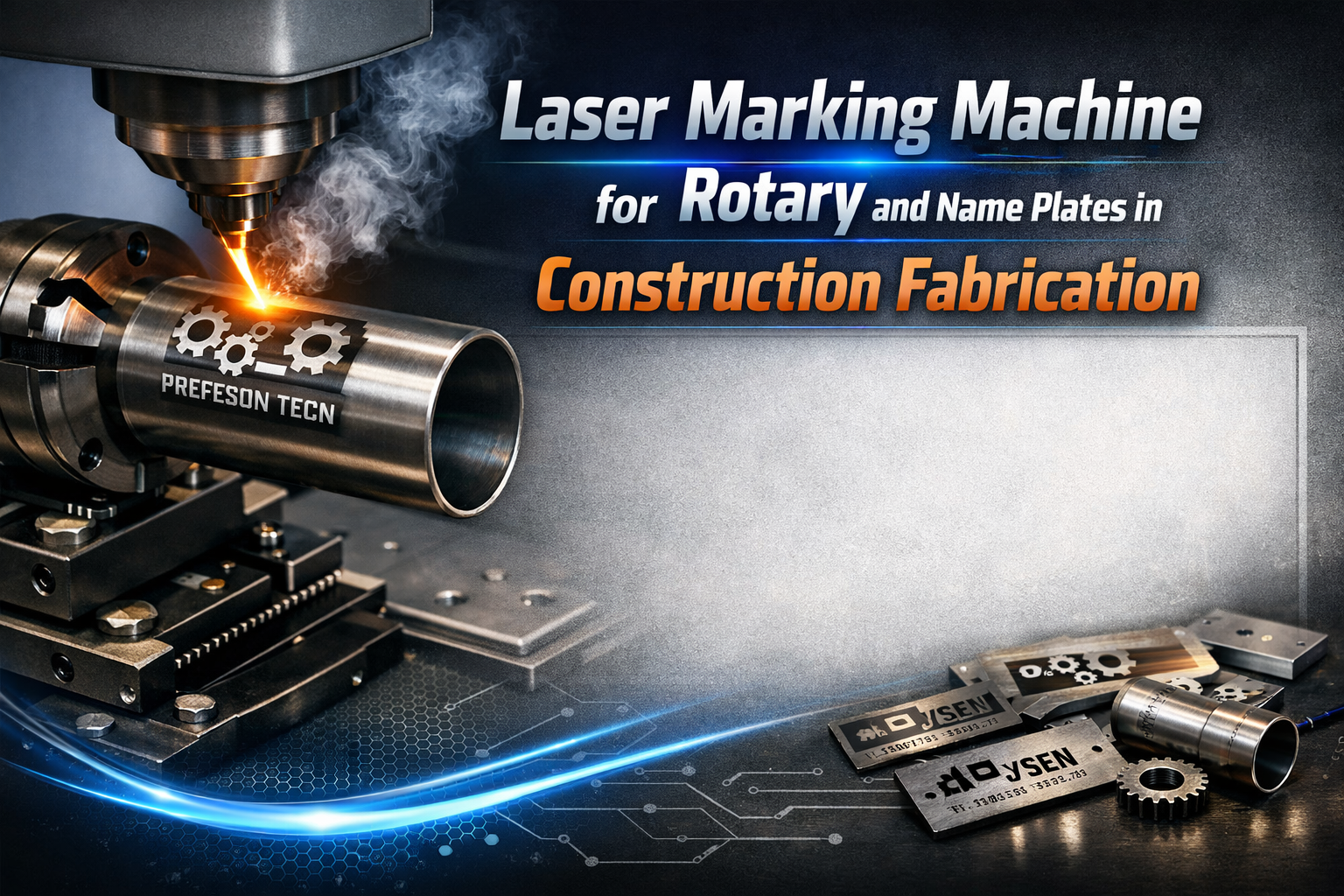
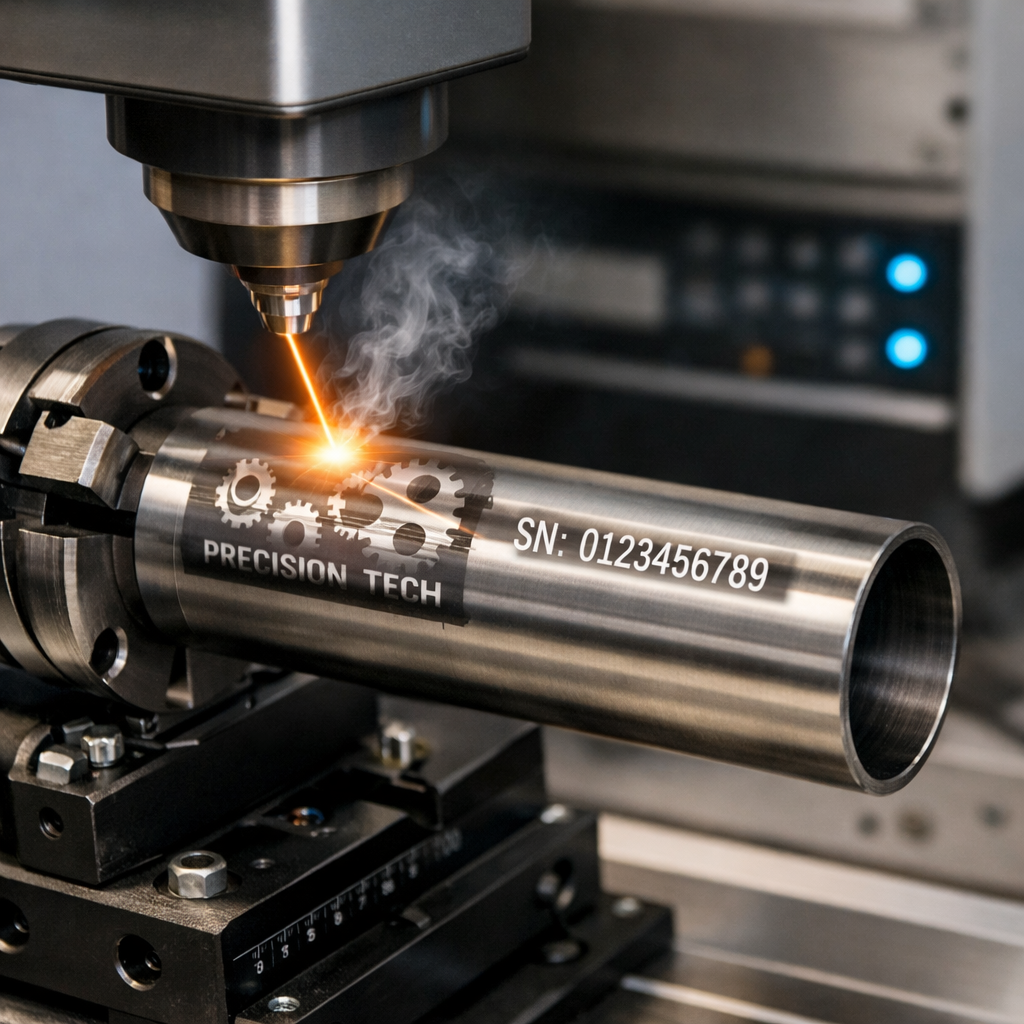
Rotary laser marking is the process of applying a permanent laser mark to a cylindrical or round part by rotating the part on an axis while the laser marks the surface. The part is held in a chuck on a rotary axis fixture. As the laser marks along the surface, the rotary axis rotates the part in synchronisation, allowing the mark to wrap continuously around the circumference without distortion.
Without a rotary axis, a flat-bed laser scanner can only mark a small flat section of a round part’s surface — the mark distorts and becomes unreadable as it follows the curve away from the scanner’s focal plane. Rotary marking keeps the marked surface perpendicular to the laser beam throughout the cycle.
What Nameplate Laser Marking Is
Nameplate laser marking produces permanent identification plates on flat metal blanks — stainless steel, aluminium, anodised aluminium, or mild steel — using a flat-bed laser marking setup. The laser marks text, logos, barcodes, QR codes, and certification symbols directly onto the metal surface, producing marks that are either recessed (engraved) or flush (annealed), depending on the marking mode and material.
Why Both Applications Appear in the Same Fabrication Shop
A construction fabrication shop that marks round structural profiles for traceability and produces nameplates for completed assemblies needs both capabilities. The practical solution is a single fibre laser marking machine equipped with a rotary axis attachment. In flat-bed mode it marks nameplates. With the rotary axis attached, the same machine marks cylindrical components.
Key Insight: A fibre laser marking machine with a rotary axis attachment is not two machines — it is one machine with two configurations. The investment covers both applications, and the machine switches between them in a few minutes of fixture changeover time.
3. Rotary Laser Marking — How It Works and What It Marks
Understanding the mechanics of rotary marking is important for specifying the right machine and evaluating whether a supplier’s rotary capability covers the range of parts in your production.
The Rotary Axis Mechanism
A rotary axis consists of a motorised chuck that holds the cylindrical part, a tailstock for longer parts, and a stepper motor that rotates the chuck in precise increments synchronised with the laser’s scanning movement. The operator defines the part diameter and the software calculates the rotation speed needed to produce undistorted marks around the circumference — this calculation is automatic in most modern marking software.
Profile Types the Rotary Axis Handles
- Round hollow sections (CHS) and circular pipes
- Anchor bolts and foundation fixing bolts — grade and specification marks on the bolt shank
- Threaded rods — certification codes and length marks
- Round bracing members in PEB and truss structures — erection marks and component IDs
- Cylindrical shafts and mechanical components
- Round balustrade posts and handrail tubes — part numbers for assembly sequencing
What Rotary Marking Applies
- Heat codes and material certificate numbers
- Material grade marks and specification standards
- Batch numbers and production date codes
- Project reference codes and erection marks
- QR codes linking to digital component records
- Certification and inspection stamps
Diameter Range — What to Check Before Buying
Common rotary axis diameter ranges are 5mm to 150mm or 10mm to 200mm. For construction fabrication where anchor bolts may be as small as 12mm and round hollow sections as large as 219mm OD, confirm that the rotary axis covers your full diameter range before purchasing.
Watch Out: A rotary axis that handles your average diameter but not your largest or smallest parts is not a complete solution. Always specify based on your full diameter range — from the smallest fastener you mark to the largest round profile.
4. Nameplate Laser Marking — How It Works and What It Produces
In flatbed mode, the laser marking machine focuses its beam onto a flat metal blank and the galvo scanner moves the beam across the surface at high speed, following the pattern defined in the software. A standard nameplate with text, logo, and serial number is typically marked in 5 to 30 seconds.
Nameplate Materials
- Stainless steel (304/316): Most common industrial nameplate material. Laser engraving or annealing — both permanent and corrosion-resistant.
- Aluminium (natural or anodised): Common for equipment nameplates. Anodised aluminium accepts high-contrast marks from laser ablation of the anodising layer.
- Brass: Used for premium identification plates and architectural signage.
- Mild steel: For industrial nameplates where corrosion resistance is less critical — painted after marking.
What Construction and PEB Nameplates Contain
- Manufacturer name, logo, and contact information
- Serial number — unique to each fabricated unit
- Date of manufacture and applicable design standard reference
- Load rating, span, and structural capacity data
- Quality inspection stamp and inspector identification
- Project reference and client name on bespoke fabrications
Mark Modes for Nameplates
Laser engraving: The laser removes material, creating a recessed mark. Remains readable after painting — the paint fills the recess and the engraved text shows as a colour contrast. Used for construction nameplates that will be painted.
Laser annealing: Used on stainless steel. The laser heats the surface to produce a colour change without removing material. The mark is smooth, flush, and corrosion-resistant — used for food-grade and premium architectural nameplates.
Variable Data Marking
Variable data marking applies a different serial number, date, or other data field to each plate in a batch automatically, without the operator stopping the machine. The software links to a sequential number or database and substitutes the variable field for each marking cycle.
Pro Tip: Variable data marking is not optional for a production nameplate operation. A machine without it requires the operator to manually change the serial number for every plate — at 50 plates per batch, this adds hours of operator time per day.
5. Applications in Construction Fabrication — Rotary Marking
Rotary marking applications in a construction fabrication shop fall into three categories: traceability marking on structural round profiles, grade and specification marking on fasteners and fixings, and erection sequencing marks on round assembly components.
Structural Round Hollow Sections and CHS Members
CHS members used as columns, bracing, or architectural structural elements need permanent marking that links each piece to its material certificate. Paint stick marks disappear during shot blasting and painting. Rotary laser marking applies heat codes and batch numbers directly to the steel surface — marks that survive the full fabrication and construction process and remain readable after painting.
Anchor Bolts and Foundation Fixings
High-strength anchor bolts carry mandatory grade and specification marks under structural standards. These marks must be on the bolt itself — not on packaging. Rotary laser marking on the bolt shank applies grade designations, specification numbers, and lot codes permanently in a format that survives installation.
Threaded Rods and High-Strength Fasteners
Threaded rods used as tie rods, bracing tension members, and lifting attachments carry specification and grade requirements. Rotary marking applies codes along the rod length, ensuring the specification is readable at any inspection point.
Round Bracing Members in PEB and Truss Structures
PEB bracing systems often include round rod or pipe bracing members that must carry erection marks for site identification. In a large PEB project with many identical-looking round bracing members of different lengths, rotary laser marking of component IDs ensures the erection crew can identify each piece without measuring.
Why Flat-Bed Marking Cannot Replace Rotary Marking
A flat-bed laser marker can apply a mark only to a narrow flat section of a round part’s surface. As the surface curves away from the focal plane, the mark becomes defocused and unreadable. For marks that must be readable from any angle, rotary marking is the only reliable method.
6. Applications in Construction Fabrication — Nameplate Marking
Nameplate marking in construction fabrication serves two purposes: identifying the fabricated assembly for quality audit and certification, and providing the end client with permanent documentation attached to the structure itself.
Structural Module Nameplates
Prefabricated structural modules — mezzanine floor frames, plant room structures, modular building frames — carry nameplates identifying the manufacturer, design specification, load rating, and serial number. Laser-marked nameplates on stainless steel or aluminium are permanently attached after fabrication and survive painting, powder coating, and decades of service.
PEB Building Nameplates
Pre-engineered buildings typically carry a building nameplate at the main entrance portal — showing the building reference, design standard, primary frame span and height, date of manufacture, and the name of the fabricator. This is a permanent record of the building’s structural credentials, required by the building owner for maintenance, modification, and resale documentation.
Equipment and Machinery Nameplates
Industrial buildings house overhead cranes, mezzanine lift systems, ventilation plant, and fire suppression systems — all of which carry mandatory identification nameplates. Fabrication shops that supply equipment frames and structural supports also supply the nameplates for the equipment they fabricate.
Safety and Compliance Plates for Certified Assemblies
Structural assemblies subject to statutory inspection — pressure equipment support frames, lifting equipment, suspended access systems — carry safety plates stating design load, inspection date, and certifying body reference. Laser engraving on stainless steel meets all permanence and legibility requirements under the applicable standards.
For a complete guide to nameplate and rotary marking applications across fabrication shops, read Name Plate and Rotary Laser Marking for Fabrication Shops.
7. Applications Beyond Construction — Industrial and Commercial Nameplate Marking
A laser marking machine installed for structural marking and nameplate production is also capable of serving adjacent markets — increasing machine utilisation and revenue-generating potential.
Industrial Machinery Nameplates
Every piece of industrial machinery — pumps, compressors, gearboxes, motors — carries a nameplate stating the manufacturer’s name, model number, serial number, rated capacity, and electrical supply data. A fabrication shop with laser marking capability can supply industrial machinery nameplates as a service — a low-capital-cost revenue stream using machine time that would otherwise be idle.
Pressure Vessel and Tank Identification
Pressure vessels and storage tanks carry mandatory identification plates under the Factories Act and associated Indian standards. These plates state design pressure, test pressure, material specification, and inspecting authority. Laser engraving on stainless steel produces these plates to the permanence and legibility standard required.
Trophy, Award, and Recognition Plaque Production
Laser-marked plaques and trophies on brass, aluminium, and anodised aluminium use the same flat-bed laser marking setup as industrial nameplates. For a fabrication shop, adding trophy and plaque production as a secondary revenue stream requires no additional equipment — only different artwork files and a corporate buyer customer base.
For a full guide to nameplate and rotary marking applications and machine selection, read Name Plate and Rotary Laser Marking for Fabrication Shops.
8. Machine Specifications — What to Evaluate for Rotary and Nameplate Marking
Laser marking machine specifications for rotary and nameplate applications differ from cutting machine specifications — power levels are lower, software specification is more important, and the rotary axis capability must match your full diameter range.
Laser Source Type
For metal marking in construction fabrication — mild steel, stainless steel, aluminium, and brass — a fibre laser source is the correct choice. CO2 lasers are not suitable for direct metal marking. A MOPA (Master Oscillator Power Amplifier) fibre laser offers variable pulse width control — enabling colour marking on stainless steel for premium nameplates.
Laser Power for Marking Applications
| Power Range | Mark Depth on Steel | Throughput | Best Application | Typical Use |
| 20W – 30W | Light surface mark | Low-medium | Thin SS nameplates, Al plates | Small shops, low volume |
| 50W – 60W | Good depth on mild steel | Medium-high | Standard nameplates, most fab work | Most fabrication shops |
| 100W | Deep engraving | High | Heavy structural marking, high speed | High-volume, thick material |
| JPT MOPA | Variable pulse control | Medium | Colour marking SS, fine detail | Premium nameplates |
Marking Field Size — F-Theta Lens
The marking field is the area the laser can mark without repositioning the workpiece. Common field sizes are 110x110mm, 150x150mm, 175x175mm, and 200x200mm. For nameplate production, the field size determines the maximum nameplate dimension the machine can mark in a single scan.
Watch Out: Do not buy a machine with a 110mm x 110mm marking field for nameplate production if any of your standard nameplate sizes exceed 100mm in either dimension. Specify a 175mm or 200mm field to cover all standard nameplate formats without repositioning.
Rotary Axis Specification
- Chuck type: A 3-jaw or 4-jaw chuck holds the part at one end. Suitable for anchor bolts, short rod sections, and smaller profiles.
- Centres type: The part is supported between two pointed centres. Better for long parts such as threaded rods and round hollow sections.
- Maximum diameter: Confirm the rotary axis handles your largest round profile — standard ranges are up to 150mm or 200mm diameter.
- Minimum diameter: Confirm the minimum gripping diameter for small anchor bolts such as M12 and M16.
- Maximum part length: Confirm the distance between supports handles your longest member — for round bracing members, this may be 1000mm to 2000mm.
9. Mark Quality and Permanence — What Construction Fabrication Requires
The reason construction fabrication requires laser marking rather than other identification methods comes down to permanence. A mark that disappears during fabrication or site exposure is not a mark — it is a false assurance of traceability.
| Method | Permanence | Survives Paint | Machine Read | Nameplate Quality | Speed |
| Laser Engraving | Permanent | Yes | Yes (QR/BC) | Excellent | Fast |
| Laser Annealing (SS) | Permanent | Yes | Yes | Premium | Fast |
| Rotary Engraving | High | Yes | No | Good | Slow |
| Screen Printing | Medium | No | No | Good | Medium |
| Dot Peen Stamping | High | Yes | No | Poor | Medium |
| Adhesive Label | Low | No | Partial | Poor | Fast |
| Paint Stick / Chalk | Very Low | No | No | N/A | Fast |
Engraving Depth and Paint Survival
A laser-engraved mark on mild steel creates a recessed channel. When the part is painted, the paint fills this channel. After painting, the engraved mark remains readable — the paint in the channel contrasts with the painted surface. The depth required for a mark to survive standard primer and topcoat application is 0.05mm to 0.15mm — achievable with a 50W fibre laser at standard parameters. For powder coating, deeper engraving of 0.15mm to 0.3mm is recommended.
QR Code Readability Requirements
The minimum reliable module size for a QR code on structural steel is approximately 0.3mm per module — producing a QR code of at least 10mm x 10mm for a 32×32 module code. Test QR code readability at a supplier demonstration: mark a QR code on your standard steel grade, paint over it, and scan with a standard smartphone camera.
Pro Tip: Bring your actual structural steel samples to every supplier demonstration. Ask them to mark a serial number and QR code, paint over the mark, and demonstrate that it scans. This single test validates the machine’s mark quality for your specific application.
10. Software — The Specification Most Buyers Overlook for Marking Machines
Laser marking machine hardware is largely standardised across suppliers at equivalent power levels. The differentiating factor is the software — and for nameplate and rotary marking applications, software quality determines how much of the machine’s capability the buyer actually uses.
Barcode and QR Code Generation
The marking software must generate barcodes and QR codes directly — not import them as images from an external programme. Built-in barcode generation allows the code content to update as part of variable data marking, with the serial number in the barcode incrementing automatically with each plate.
Variable Data Marking
The software must support sequential numbering (auto-incrementing serial numbers), date stamping (applying today’s date automatically), and database-linked marking (importing a list of variable data from a CSV or ERP system). This is the capability that makes laser marking productive for nameplate production at scale.
Logo and Artwork Import
The software must import logos in standard vector or raster formats — DXF, AI, EPS, BMP, or PNG — and produce a clean, sharp mark. Low-quality software that rasterises vector logos produces pixelated marks that look unprofessional on finished nameplates.
Rotary Axis Integration
Rotary marking requires the software to communicate with the rotary axis controller, managing rotation synchronisation with laser scanning. The operator enters the part diameter and the software calculates the wrapping parameters automatically. Confirm that the rotary axis controller is natively supported by the software.
ERP and Production System Integration
For fabrication shops tracking production digitally, the ability to pull marking data — serial numbers, project references, batch codes — directly from the production management system eliminates manual data entry and reduces marking errors.
Pro Tip: Test the software yourself at the demonstration — not just the hardware. Ask to programme a nameplate with your logo, a variable serial number, and a QR code, then run a batch of 10 plates with different serial numbers. The ease and speed of this task tells you more than any specification sheet.
11. Buying Guide — How to Choose the Right Machine for Your Marking Requirements
Use this six-step process before approaching any supplier to ensure every conversation is focused on your actual marking requirements.
Step 1 — Identify Your Primary Application
Is your priority rotary marking of cylindrical parts, nameplate production, or both equally? If rotary marking is primary, the rotary axis specification takes priority. If nameplate production is primary, the marking field size and variable data software capability take priority. If both are equally important, specify both fully without compromising on either.
Step 2 — Define Your Cylindrical Parts for Rotary Marking
List the smallest and largest diameter parts you need to mark rotationally. List the longest part. Confirm the rotary axis covers this full range before evaluating any machine — this step eliminates physically incapable machines before any other comparison.
Step 3 — Define Your Nameplate Requirements
Identify the largest nameplate format you produce in millimetres. Identify the materials you use. Determine whether you need engraving, annealing, or both. Establish your daily nameplate volume and whether variable data is required.
Step 4 — Determine Your Power Requirement
For most construction fabrication shop nameplate and rotary marking applications, 50W to 60W is the standard specification. This provides good engraving depth on mild steel and stainless steel at production speed. Only specify 100W if your application requires deep engraving on heavy structural sections or very high-speed batch marking.
Step 5 — Evaluate Software Thoroughly
Request a demonstration covering: variable data marking with auto-increment serial numbers, QR code generation with variable content, logo import from your actual logo file, and rotary axis control with diameter entry. If setting up a standard nameplate job takes more than 15 minutes, the software is not productive enough for a fabrication shop environment.
Step 6 — Assess After-Sales Support
Confirm that protective lenses and nozzle consumables are available locally — not on order from overseas. Ask for the replacement cost and typical replacement frequency. Confirm the service response time for a machine-down fault and ask for a reference contact at a fabrication shop already running the machine.
| Specification | Recommended | Why It Matters | Watch Out For |
| Laser Type | Fibre laser (MOPA for SS colour) | Best metal mark quality | CO2 lasers — not for metal marking |
| Power | 50W – 60W for most fab shops | Speed and depth on mild steel | Under 20W — too slow for production |
| Marking Field | 175x175mm or 200x200mm | Covers large nameplates | 110x110mm limits nameplate size |
| Rotary Axis | Chuck type, 5mm–200mm diameter | Handles all round profiles | Fixed centres — limited diameter range |
| Software | EzCad2 / LightBurn / OEM | Variable data, QR, font support | No variable data = manual rework per plate |
| Enclosure | Class 1 enclosed or safety measures | Operator safety compliance | Open beam without safety provisions |
| Cooling | Air-cooled (50W–60W machines) | Low maintenance, no chiller | Water cooling needed at 100W+ |
12. Conclusion
A fibre laser marking machine with a rotary axis attachment is one of the most versatile and cost-effective equipment investments a construction fabrication shop can make — because it serves two distinct and important needs from a single machine.
For rotary marking of cylindrical structural components — round hollow sections, anchor bolts, threaded rods, round bracing members — it provides the only reliable method of applying permanent, machine-readable marks that survive the full construction journey from fabrication shop to installed structure.
For nameplate production — structural assembly identification plates, PEB building nameplates, equipment identification plates, safety and compliance plates — it produces professional, permanent marks on stainless steel, aluminium, and brass that meet the requirements of quality audits and structural standards, and last for the lifetime of the structure they identify.
The standard specification that covers both applications is a 50W to 60W fibre laser marking machine with a 175mm to 200mm marking field, a rotary axis attachment rated to cover your full diameter range, and software that supports variable data marking, QR and barcode generation, and rotary axis control. This combination covers every marking requirement in a construction fabrication shop from a single compact installation.
Related Posts
Cooker Cutting Laser Machine for Kitchenware Manufacturers
A Supporting Blog — Laser Cutting and Marking Machines for…
Laser Welding Machine for Metal Fabrication Shops
A Supporting Blog- Laser Cutting and Marking Machines for Construction…
Tube Laser Cutting Machine for PEB and Construction Fabricators
A Supporting Blog — Laser Cutting and Marking Machines for…